 dlgt7
dlgt7
405 lines
10 KiB
Markdown
405 lines
10 KiB
Markdown
|
||
|
||
# TVBox
|
||
|
||
- [使用方法](./usage.md)
|
||
|
||
### TVBox资源接口外链托管网址:感觉哪个好用用哪个,能不能用,好不要用,有没有坑,自己测试。网上的东西,只是收集,不做测试推荐。
|
||
|
||
1、https://gitea.com/ 已开始限制,清理
|
||
|
||
2、https://gitee.com/
|
||
|
||
3、https://agit.ai/
|
||
|
||
4、云储: https://yunchu.cxoip.com/
|
||
|
||
5、腾讯云: https://coding.net/
|
||
|
||
6、瑞典外链网盘:https://anonfiles.com/
|
||
|
||
7、比邻: https://pan.bilnn.com 收费了,能在线编辑
|
||
|
||
8、惜染 https://mpimg.cn/ 不能在线编辑
|
||
|
||
9、枫铭网盘: https://pan.dkpoi.com 不能编辑
|
||
|
||
10、https://out.zxglife.top 不能编辑
|
||
|
||
11、OpenDrive: https://www.opendrive.com/ 能在线编辑,慢
|
||
|
||
12、nite07网盘 https://share.nite07.com
|
||
|
||
13、ifilespace https://demo.ifile.space/main
|
||
|
||
14、七彩云存储: https://cloud.06dn.com/login
|
||
|
||
15、豆子外链: http://zuoye.free.fr/index.php 限制文件格式
|
||
|
||
16、棱束链: https://www.lingshulian.com/
|
||
|
||
17、凯速网https://my.ksust.com
|
||
|
||
18、乐分发存储:https://pan.leffs.cn/Login
|
||
|
||
19、https://www.jsdelivr.com/
|
||
|
||
20、恩华云盘:https://pan.ehvip.cn
|
||
|
||
21、诺灸:https://www.cloudewl.cn
|
||
|
||
22、https://gitcode.net/explore
|
||
|
||
23、吾爱云盘:http://52bsj.vip:81/login
|
||
|
||
24、https://codeberg.org/
|
||
|
||
25、https://www.notabug.org
|
||
|
||
26、书源 http://shuyuan.miaogongzi.net/index.php
|
||
|
||
## 短链接制作网址:哪个稳定自己测试。
|
||
|
||
https://gg.gg
|
||
|
||
https://qiu.moe
|
||
|
||
https://www.c1n.cn
|
||
|
||
https://0dlj.cn
|
||
|
||
https://0a.fit
|
||
|
||
http://mtw.so
|
||
|
||
https://sd4.cn
|
||
|
||
https://pqu.cn
|
||
|
||
https://88d.cn
|
||
|
||
https://loveer.win
|
||
|
||
https://mtool.chinaz.com/dwz
|
||
|
||
https://waurl.cn
|
||
|
||
https://dwz.dk
|
||
|
||
## 壁纸:
|
||
|
||
http://www.kf666888.cn/api/tvbox/img
|
||
|
||
https://picsum.photos/1280/720/?blur=10
|
||
|
||
https://qiu.moe/a723
|
||
|
||
|
||
## 解析测试:
|
||
|
||
http://www.36nu.com/apiTest
|
||
|
||
### 更新
|
||
|
||
## 多jar链接写法,根据app版本来:
|
||
|
||
## Pluto Player版本:
|
||
|
||
{"key":"***","name":"***","api":"***","type":3,"filterable":1,"quickSearch":1,"searchable":1,"plugin":"http://****/*.jar"},
|
||
|
||
## 这个:
|
||
|
||
{"key":"***","name":"***","type":3,"api":"***","searchable":1,"quickSearch":1,"filterable":1,"spider":"http://****/*.jar"},
|
||
|
||
## 俊佬版本多jar链接写法:
|
||
|
||
{"key":"***","name":"***","type":3,"api":"***","searchable":1,"quickSearch":1,"filterable":1,"jar":"your_other_jar"},
|
||
|
||
|
||
## 牛人制作网站:版本收集、接口收集、TG群收集,小白有这个网站能躺平了!也可以自己微信公众号搜集。
|
||
|
||
云星:https://shou.eruu.cn/
|
||
|
||
奇奇:http://bbs.qiqiv.cn/thread-11973-1-1.html
|
||
|
||
https://github.com/tv-player/TvBox
|
||
|
||
## 神人年年有,今年特别多,接口焦虑症的小白看这,自动获取接口。
|
||
|
||
https://github.com/vpei/Free-TVUrl-Merge
|
||
|
||
## TVBox配置编辑器:
|
||
|
||
https://kvymin.github.io/CatVodTVJsonEditor/
|
||
|
||
http://cron.qiqiv.cn/cron/abc/123/
|
||
|
||
## 给TVbox站源添加符号:
|
||
|
||
很多人喜欢给TVbox的站源或者电视直播频道自定义一个符号,比如下面这类,实际上就是增加了网页符号。
|
||
|
||
|
||

|
||
|
||
这里推荐两个非常不错的网页符号复制粘贴地址。
|
||
|
||
https://funletu.com/emoji/
|
||
|
||
https://www.emojiall.com/zh-hans
|
||
|
||
## Cloudreve个人网盘GitHub开源地址:
|
||
|
||
https://github.com/cloudreve/Cloudreve
|
||
|
||
## 比较牛逼的仓库:
|
||
|
||
唐三大佬仓库地址:https://github.com/Tangsan99999/TvJar 删库了
|
||
|
||
于俊大佬:
|
||
|
||
https://github.com/q215613905/TVBoxOS
|
||
|
||
takagen99大佬:
|
||
|
||
https://github.com/takagen99/TVBoxOSC
|
||
|
||
FongMi-TV:
|
||
|
||
https://github.com/FongMi/TV
|
||
|
||
TV猫盒:
|
||
|
||
https://github.com/kensonmiao/CatVodTVOSC
|
||
|
||
pluto-player:不开源 A佬。魔改,改动大,功能多,能在线升级,目前不支持低版本安卓。
|
||
|
||
https://github.com/pluto-player/updates
|
||
|
||
o0HalfLife0o:
|
||
|
||
https://github.com/o0HalfLife0o/TVBoxOSC
|
||
|
||
https://github.com/o0HalfLife0o/AlphaTV
|
||
|
||
clanTV:
|
||
|
||
https://github.com/clanTV/clanTV
|
||
|
||
BearTV:
|
||
|
||
https://github.com/haha459862/BearTV
|
||
|
||
官仓:终结于2022年7月18日。封仓。
|
||
|
||
https://github.com/CatVodTVOfficial/TVBoxOSC
|
||
|
||
多线路TV版本仓库:
|
||
|
||
https://github.com/tv-player
|
||
|
||
自己动手升级PYthon版本参照下面仓库:里边有操作说明,复制代码,粘贴就行。
|
||
|
||
https://github.com/UndCover/PyramidStore
|
||
|
||
手残的话,用下边这个方法,一键生成,不用自己复制代码。根据自己需要稍稍修改一下子。
|
||
|
||
https://github.com/lm317379829/TVBoxDIY
|
||
|
||
## 常用工具:
|
||
|
||
免魔法电报,也是个开源项目,用前自己上网查询这个怎么样。
|
||
|
||
https://github.com/NekoX-Dev/NekoX
|
||
|
||
文本比较、json格式化:
|
||
https://tsq.lanzouf.com/b0c4rjpsb
|
||
密码:123
|
||
|
||
开发者工具箱:
|
||
https://1024tools.com/
|
||
|
||
文本处理:
|
||
http://www.txttool.com/
|
||
|
||
直播源批量检测工具:
|
||
https://tsq.lanzouf.com/b0c4p2fba
|
||
密码:123
|
||
|
||
MXPlayer-Pro-1.46.10高级解锁版:
|
||
https://tsq.lanzouf.com/b0c4p1nyf
|
||
密码:123
|
||
|
||
MD5获取小工具:http://www.metools.info/
|
||
|
||
MD5在TVbox中的填写格式:"spider": "https://j***.jar;md5;***",
|
||
|
||
## json内资源格式参数介绍
|
||
|
||
{"key":"key_〔资源名称〕",
|
||
|
||
"name":"资源名称",
|
||
|
||
"type":0,
|
||
|
||
"api":"csp_〔jar内文件名称〕",
|
||
|
||
"searchable":1,
|
||
|
||
"quickSearch":1,
|
||
|
||
"filterable":0,
|
||
|
||
"jar":"〔jar文件地址〕",
|
||
|
||
"ext":"〔txt json文件地址〕",
|
||
|
||
"playUrl": "〔播放解析地址〕",
|
||
|
||
"click": "ddys.tv;#vjsp > button"
|
||
|
||
"categories":["〔自定义资源列表〕",
|
||
|
||
"〔自定义资源列表〕"] }
|
||
|
||
## jar修改学习:要想实现jar包自由,多关注以下仓库,慢慢积累经验学习吧。看看谁常更新,盯住学习就行。
|
||
|
||
jar打包:在jar仓库里依次点击:actions-workflows-spider jar gen cl-run workflow。和打包TVBOX一样。
|
||
|
||
jar打包成功实例仓库:仅供参考,自行添加新的,删除或者修改失效的。https://github.com/dlgt7/TvJar
|
||
|
||
https://github.com/Kimlee-cmd/TvJar
|
||
|
||
https://github.com/Kvymin/CatVod
|
||
|
||
传说中的T4类型,仓库地址如下,自己研究。
|
||
|
||
https://github.com/sec-an/TV_Spider
|
||
|
||
## 电脑修改 apk 所需软件
|
||
|
||
0、首推吾爱破解工具包:
|
||
|
||
https://down.52pojie.cn/Tools/
|
||
|
||
1、下载解压编译器 AndroidKiller https://mydown.yesky.com/pcsoft/413552646.html
|
||
|
||
2、安装 java8 环境 http://soft.onlinedown.net/soft/10044859.htm
|
||
|
||
3、下载编码器,
|
||
|
||
改名为 ShakaApktool.jar 替换 AndroidKiller\bin\apktool\apktool https://bitbucket.org/iBotPeaches/apktool/downloads/
|
||
|
||
## jar包缝合教程:暴力缝合,非代码修改。
|
||
|
||
准备工作:MT管理器或者NP管理器,B包要用的包,A包要导出的包。
|
||
|
||
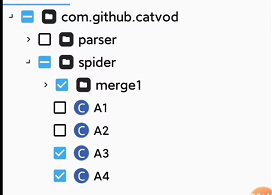
开始:A包中merge重命名,展开重命名的merge,选中需要导出的文件,导出。打开B包,导入刚才导出的重命名的merge文件,保存退出。B包就是缝合好的包。
|
||
|
||
多试几次,关键是找个好用的MT或者NP。不是你不会,是因为你的MT或着NP没那个功能。
|
||
|
||
1、打开需要导出的包:
|
||
|
||

|
||
|
||
2、给他重命名:
|
||
|
||

|
||
|
||
3、选中,并导出你需要的文件:
|
||
|
||
|
||
|
||
4、随便取个名字,自己能找到就行,理解就好。
|
||
|
||

|
||
|
||
5、打开你最终要用的包,导入刚才那个包导出的东西。
|
||
|
||

|
||
|
||
6、导入完成后的样子:
|
||
|
||

|
||

|
||
|
||
试试吧,不一定对。
|
||
|
||
## 今天看到一个新的教程:
|
||
【教程】Pluto player影视软件新姿势_无密码挂载alist_免费观看原画
|
||
|
||
8款网盘可同时挂载到Kodi播放器,支持Mac和Windows平台
|
||
|
||
教程在仓库里:https://github.com/dlgt7/TVbox-interface PDF文件格式,需下载查看,感觉不清楚的话,文件里写有教程出处,都是公众号文章。
|
||
|
||
api解释:
|
||
|
||
csp_XPath 普通套娃
|
||
|
||
csp_XPathMac 直链套娃
|
||
|
||
csp_XPathFilter 普通套娃带筛选
|
||
|
||
csp_XPathMacFilter 直链套娃带筛选
|
||
|
||
csp_XPathEgg 蛋蛋赞自定义套娃
|
||
|
||
************************************************************************************************************************
|
||
|
||
|
||
套娃依赖自定义爬虫jar,同样需要在自定义json中加入相应的配置,type=3, api为csp_XPath,套娃相关规则配置在ext字段中,注意:ext字段值只能是字符串
|
||
|
||
为控制配置文件容量,同时支持在ext字段中直接配置规则和拉取规则的网址。 2021.10.21 by 小黄瓜
|
||
|
||
接口指定播放器写法示例:
|
||
|
||
{
|
||
|
||
"key": "csp_key",
|
||
|
||
"name": "api(SP)",
|
||
|
||
"type": 3,
|
||
|
||
"api": "csp_api",
|
||
|
||
"playerType": 1, // 新增字段,用来为该爬虫指定播放器 0:system, 1:ijk, 2:exo, 10:mx,11:Reex,12:Kodi.默认-1为配置页面设置的播放器(app/src/main/java/com/github/tvbox/osc/util/PlayerHelper.java...161行)
|
||
|
||
"searchable": 1,
|
||
|
||
"quickSearch": 1,
|
||
|
||
"filterable": 1
|
||
|
||
},
|
||
|
||
exo会清晰点。exo不能播阿里系,小苹果。
|
||
|
||
### 直播文件设置密码:
|
||
|
||
VIP高清秒播1_0709,#genre# 密码:0709
|
||
|
||
默认播放器设置:
|
||
|
||
App default settings can be set here : /src/main/java/com/github/tvbox/osc/base/App.java
|
||
|
||
private void initParams() {
|
||
|
||
putDefault(HawkConfig.HOME_REC, 2); // Home Rec 0=豆瓣, 1=推荐, 2=历史
|
||
|
||
putDefault(HawkConfig.PLAY_TYPE, 1); // Player 0=系统, 1=IJK, 2=Exo
|
||
|
||
putDefault(HawkConfig.IJK_CODEC, "硬解码");// IJK Render 软解码, 硬解码
|
||
|
||
putDefault(HawkConfig.HOME_NUM, 2); // History Number
|
||
|
||
putDefault(HawkConfig.DOH_URL, 2); // DNS
|
||
|
||
putDefault(HawkConfig.SEARCH_VIEW, 2); // Text or Picture
|
||
|
||
}
|
||
|
||
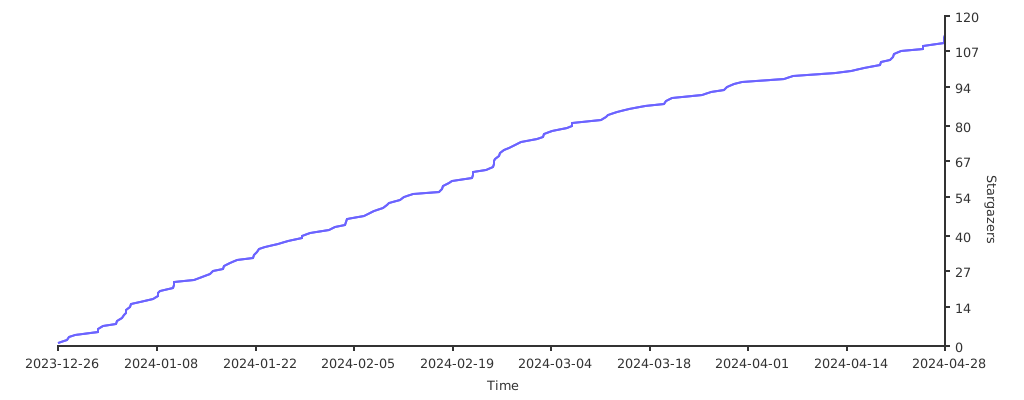
### Stargazers over time
|
||
|
||
[](https://starchart.cc/dlgt7/TVbox-interface)
|
||
|