 dlgt7
dlgt7
530 lines
15 KiB
Markdown
530 lines
15 KiB
Markdown
# webview升级
|
||
|
||
你们想要的盒子升级webview,已上传,自己找一下。adb。自己找适合自己盒子的webview版本。过程都是一样的。
|
||
|
||
接口汇总网站(好像不更新): https://cyuan.netlify.app/
|
||
|
||
https://xn--qoqw77q.top/
|
||
|
||
http://go.work.gd/_JK.htm
|
||
|
||
影视仓库:http://www.wmdz.com/
|
||
|
||
tbox:念心小站https://www.nxinxz.com/
|
||
|
||
六音软件:www.sixyin.com 发布网站:https://6yso.com/
|
||
|
||
看电视: https://www.iptvindex.com/
|
||
|
||
http://bhapp.top/
|
||
|
||
## 阅读:
|
||
http://www.yckceo.com/
|
||
|
||
https://shuyuan.yiove.com/complex
|
||
|
||
阅读app去限制:即原版删除\app\src\main\assets\18PlusList.txt,即可去除限制。
|
||
|
||
# TVBox
|
||
|
||
- [使用方法](./usage.md)
|
||
|
||
### TVBox资源接口外链托管网址:感觉哪个好用用哪个,能不能用,好不要用,有没有坑,自己测试。网上的东西,只是收集,不做测试推荐。
|
||
|
||
1、https://about.gitea.cn/
|
||
|
||
2、https://gitee.com/
|
||
|
||
3、云储: https://yunchu.cxoip.com/
|
||
|
||
4、腾讯云: https://coding.net/
|
||
|
||
5、比邻: https://pan.bilnn.com 收费了,能在线编辑
|
||
|
||
6、惜染 https://mpimg.cn/
|
||
|
||
7、ifilespace https://demo.ifile.space/main
|
||
|
||
8、七彩云存储: https://cloud.06dn.com/login
|
||
|
||
9、棱束链: https://www.lingshulian.com/
|
||
|
||
10、凯速网https://my.ksust.com
|
||
|
||
11、https://www.jsdelivr.com/
|
||
|
||
12、恩华云盘:https://pan.ehvip.cn
|
||
|
||
13、https://gitcode.net/explore
|
||
|
||
14、https://codeberg.org/
|
||
|
||
15、https://www.notabug.org
|
||
|
||
16、https://www.acwing.com/
|
||
|
||
17、https://www.jsdelivr.com/
|
||
|
||
18、https://about.gitlab.com/
|
||
|
||
19、https://cnb.cool/
|
||
|
||
## 短链接制作网址:哪个稳定自己测试。
|
||
|
||
https://gg.gg
|
||
|
||
https://www.c1n.cn
|
||
|
||
http://mtw.so
|
||
|
||
https://mtool.chinaz.com/dwz
|
||
|
||
https://waurl.cn
|
||
|
||
## 牛人制作网站:版本收集、接口收集、TG群收集,小白有这个网站能躺平了!也可以自己微信公众号搜集。
|
||
|
||
道长_DR_JS:https://github.com/hjdhnx/dr_py.git
|
||
|
||
奇奇:http://bbs.qiqiv.cn/thread-11973-1-1.html
|
||
|
||
IPTVindex:https://www.iptvindex.com/
|
||
|
||
接口汇总网站:https://cyuan.netlify.app/
|
||
|
||
接口汇总网站:https://xn--qoqw77q.top/
|
||
|
||
奥秘博客:https://omii.top/
|
||
|
||
影视仓库:http://www.wmdz.com/
|
||
|
||
欧歌:http://tv.nxog.top/
|
||
|
||
饭太硬:https://www.xn--sss604efuw.com/
|
||
|
||
菜妮丝:https://tv.xn--yhqu5zs87a.top/
|
||
|
||
肥猫:https://xn--z7x900a.live/
|
||
|
||
PGone:https://mirror.ghproxy.com/raw.githubusercontent.com/gaotianliuyun/gao/master/0825.json
|
||
|
||
高天流云:https://github.com/gaotianliuyun/gao
|
||
|
||
视频源检测与合并工具:https://github.com/openmynet/tvboxsp
|
||
|
||
阅读:http://www.yckceo.com/
|
||
|
||
阅读:https://legado.aoaostar.com/
|
||
|
||
https://skybook.pages.dev/
|
||
|
||
https://mwdh.cc/
|
||
|
||
https://qyyuapi.com/
|
||
|
||
https://loyc.xyz/
|
||
|
||
miru:https://miru.js.org/
|
||
|
||
海阔世界:
|
||
|
||
小程序:云盘君.简 https://cmd.im/3dtr
|
||
|
||
小程序:dm盒子 https://cmd.im/ftcm
|
||
|
||
小程序:道长仓库Pro https://cmd.im/4swu
|
||
|
||
六音:https://6yso.com https://www.sixyin.com
|
||
|
||
## TVBox配置编辑器:
|
||
|
||
https://zhixc.github.io/CatVodTVJsonEditor/
|
||
|
||
https://kvymin.github.io/CatVodTVJsonEditor/
|
||
|
||
## 给TVbox站源添加符号:
|
||
|
||
很多人喜欢给TVbox的站源或者电视直播频道自定义一个符号,比如下面这类,实际上就是增加了网页符号。
|
||
|
||
|
||

|
||
|
||
这里推荐两个非常不错的网页符号复制粘贴地址。
|
||
|
||
https://funletu.com/emoji/
|
||
|
||
https://www.emojiall.com/zh-hans
|
||
|
||
## Cloudreve个人网盘GitHub开源地址:
|
||
|
||
https://github.com/cloudreve/Cloudreve
|
||
|
||
## 比较牛逼的仓库:
|
||
|
||
FongMi-TV:内有2个版本,一个是ok版本,一个是fongmi版本
|
||
|
||
https://github.com/FongMi/TV
|
||
|
||
https://github.com/okcaptain/TV
|
||
|
||
于俊大佬:
|
||
|
||
https://github.com/q215613905/TVBoxOS
|
||
|
||
takagen99大佬:
|
||
|
||
https://github.com/takagen99/TVBoxOSC
|
||
|
||
影视仓 公众号:派大星开发
|
||
|
||
竹子哥:https://github.com/zhuziwuming/TVBoxOSq
|
||
|
||
黑盒魔改:https://github.com/MyShellTV/ShellTV
|
||
|
||
uz:https://github.com/YYDS678/uzVideo-extensions
|
||
|
||
版本发布o0HalfLife0o:https://github.com/o0HalfLife0o/TVBoxOSC
|
||
|
||
官仓:终结于2022年7月18日。封仓。
|
||
|
||
https://github.com/CatVodTVOfficial/TVBoxOSC
|
||
|
||
多仓版本:https://github.com/mlabalabala/box
|
||
|
||
弹幕版本:https://github.com/lppsuixn/Box
|
||
|
||
弹幕版本:https://github.com/lppsuixn/TVBoxOS
|
||
|
||
开源手机版:https://github.com/XiaoRanLiu3119/TVBoxOS
|
||
|
||
基于fongmi桌面版:https://github.com/Greatwallcorner/TV-Multiplatform
|
||
|
||
桌面版配套爬虫:https://github.com/Greatwallcorner/CatVodSpider
|
||
|
||
ZyPlayer桌面版:https://github.com/Hiram-Wong/ZyPlayer
|
||
|
||
ZyPlayer手机版:
|
||
|
||
猫影视:https://github.com/catvod/CatVodOpen
|
||
|
||
配套爬虫:https://github.com/jadehh/TVSpider
|
||
|
||
各种版本很多,都很有特色,根据自己的喜好,加一些QQ群,或者朋友推荐,找适合自己的版本。
|
||
|
||
自己动手升级PYthon版本参照下面仓库:里边有操作说明,复制代码,粘贴就行。
|
||
|
||
https://github.com/UndCover/PyramidStore
|
||
|
||
手残的话,用下边这个方法,一键生成,不用自己复制代码。根据自己需要稍稍修改一下子。
|
||
|
||
https://github.com/lm317379829/TVBoxDIY 已经删库,但是你搜TVBoxDIY会有很多,自己照着修改一下。
|
||
|
||
调试助手:公众号:一个菜花。
|
||
|
||
https://git.acwing.com/iduoduo/tiaoshi/-/raw/main/ba.json
|
||
|
||
https://git.acwing.com/iduoduo/tiaoshi/-/raw/main/BB.json
|
||
|
||
## 常用工具:
|
||
|
||
免魔法电报,也是个开源项目,用前自己上网查询这个怎么样。
|
||
|
||
https://github.com/NekoX-Dev/NekoX
|
||
|
||
文本比较、json格式化:
|
||
https://tsq.lanzouf.com/b0c4rjpsb
|
||
密码:123
|
||
|
||
开发者工具箱:
|
||
https://1024tools.com/
|
||
|
||
文本处理:
|
||
http://www.txttool.com/
|
||
|
||
直播源批量检测工具:
|
||
https://tsq.lanzouf.com/b0c4p2fba
|
||
密码:123
|
||
|
||
MXPlayer-Pro-1.46.10高级解锁版:
|
||
https://tsq.lanzouf.com/b0c4p1nyf
|
||
密码:123
|
||
|
||
MD5获取小工具:http://www.metools.info/
|
||
|
||
MD5在TVbox中的填写格式:"spider": "https://j***.jar;md5;***",
|
||
|
||
## json内资源格式参数介绍
|
||
|
||
{"key":"key_〔资源名称〕",
|
||
|
||
"name":"资源名称",
|
||
|
||
"type":0,
|
||
|
||
"api":"csp_〔jar内文件名称〕",
|
||
|
||
"searchable":1,
|
||
|
||
"quickSearch":1,
|
||
|
||
"filterable":0,
|
||
|
||
"jar":"〔jar文件地址〕",
|
||
|
||
"ext":"〔txt json文件地址〕",
|
||
|
||
"playUrl": "〔播放解析地址〕",
|
||
|
||
"click": "ddys.tv;#vjsp > button"
|
||
|
||
"categories":["〔自定义资源列表〕",
|
||
|
||
"〔自定义资源列表〕"] }
|
||
|
||
## jar修改学习:要想实现jar包自由,多关注以下仓库,慢慢积累经验学习吧。看看谁常更新,盯住学习就行。
|
||
|
||
jar打包:在jar仓库里依次点击:actions-workflows-spider jar gen cl-run workflow。和打包TVBOX一样。
|
||
|
||
jar打包成功实例仓库:仅供参考,自行添加新的,删除或者修改失效的。https://github.com/dlgt7/TvJar
|
||
|
||
https://github.com/mymine/CatVodTVSpider/actions
|
||
|
||
https://github.com/zhixc/CatVodTVSpider
|
||
|
||
https://github.com/FongMi/CatVodSpider
|
||
|
||
https://github.com/Kvymin/CatVodSpider
|
||
|
||
传说中的T4类型,仓库地址如下,自己研究。
|
||
|
||
https://github.com/sec-an/TV_Spider
|
||
|
||
## 电脑修改 apk 所需软件
|
||
|
||
0、首推吾爱破解工具包:
|
||
|
||
https://down.52pojie.cn/Tools/
|
||
|
||
1、下载解压编译器 AndroidKiller https://mydown.yesky.com/pcsoft/413552646.html
|
||
|
||
2、安装 java8 环境 http://soft.onlinedown.net/soft/10044859.htm
|
||
|
||
3、下载编码器,
|
||
|
||
改名为 ShakaApktool.jar 替换 AndroidKiller\bin\apktool\apktool https://bitbucket.org/iBotPeaches/apktool/downloads/
|
||
|
||
## jar包缝合教程:暴力缝合,非代码修改。
|
||
|
||
准备工作:MT管理器或者NP管理器,B包要用的包,A包要导出的包。
|
||
|
||
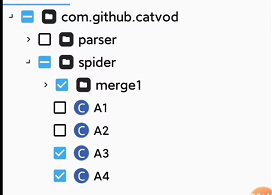
开始:A包中merge重命名,展开重命名的merge,选中需要导出的文件,导出。打开B包,导入刚才导出的重命名的merge文件,保存退出。B包就是缝合好的包。
|
||
|
||
多试几次,关键是找个好用的MT或者NP。不是你不会,是因为你的MT或着NP没那个功能。
|
||
|
||
1、打开需要导出的包:
|
||
|
||

|
||
|
||
2、给他重命名:
|
||
|
||

|
||
|
||
3、选中,并批量导出你需要的文件:
|
||
|
||
|
||
|
||
4、随便取个名字,自己能找到就行,理解就好。
|
||
|
||

|
||
|
||
5、打开你最终要用的包,导入刚才那个包导出的东西。
|
||
|
||

|
||
|
||
6、导入完成后的样子:
|
||
|
||

|
||

|
||
|
||
试试吧,不一定对。
|
||
|
||
缝包时的精简:使用Maven工具。
|
||
|
||
以下是针对合并并精简 TVBox 相关 JAR 包的详细步骤指南,工具和操作均以小白友好方式描述:
|
||
|
||
---
|
||
|
||
### **一、准备工作**
|
||
1. **工具下载**:
|
||
- 压缩工具:[7-Zip](https://www.7-zip.org/)(用于解压/压缩 JAR)
|
||
- 代码反编译工具:[JD-GUI](http://java-decompiler.github.io/)(查看类文件内容)
|
||
- 代码混淆工具:[ProGuard](https://github.com/Guardsquare/proguard)(精简和优化代码)
|
||
- 文件对比工具:[WinMerge](https://winmerge.org/)(对比重复文件)
|
||
- Java 环境:确保已安装 [JDK](https://www.oracle.com/java/technologies/downloads/)(需 `java` 和 `jar` 命令)
|
||
|
||
2. **备份原始 JAR**:
|
||
- 复制原始 JAR 包到安全位置,避免操作失误导致文件损坏。
|
||
|
||
---
|
||
|
||
### **二、合并 JAR 包**
|
||
#### **步骤 1:解压 JAR 文件**
|
||
1. 创建两个空文件夹,如 `jar1` 和 `jar2`。
|
||
2. 右键点击第一个 JAR 文件,选择 **7-Zip → Extract to "jar1\"**。
|
||
3. 同理解压第二个 JAR 到 `jar2` 文件夹。
|
||
|
||
#### **步骤 2:合并文件夹**
|
||
1. 新建一个文件夹 `merged`,将 `jar1` 和 `jar2` 的内容全部复制进去。
|
||
2. **处理重复文件**:
|
||
- 使用 **WinMerge** 打开 `merged` 文件夹,对比重复文件。
|
||
- 若发现同名但内容不同的类(如 `a.class` 和 `a.class`),用 JD-GUI 打开二者,判断功能差异,保留更新或更合理的版本。
|
||
- 若资源文件(如图片、配置)重复,直接保留一份即可。
|
||
|
||
#### **步骤 3:删除签名信息**
|
||
- 删除 `merged/META-INF` 文件夹内的所有 `.SF`、`.RSA`、`.DSA` 文件(避免签名冲突)。
|
||
|
||
#### **步骤 4:重新打包**
|
||
1. 打开命令行,进入 `merged` 目录:
|
||
```bash
|
||
cd path/to/merged
|
||
```
|
||
2. 执行打包命令:
|
||
```bash
|
||
jar cvf merged.jar *
|
||
```
|
||
- 生成的 `merged.jar` 即为合并后的文件。
|
||
|
||
---
|
||
|
||
### **三、精简 JAR 包**
|
||
#### **步骤 1:移除冗余依赖**
|
||
1. 用 **JD-GUI** 打开原始 JAR,检查是否存在第三方库(如 `com.google.gson`, `okhttp3`)。
|
||
2. 如果两个 JAR 包含相同库的不同版本,删除旧版本(如保留 `gson-2.8.9` 删除 `gson-2.6.2`)。
|
||
|
||
#### **步骤 2:使用 ProGuard 优化**
|
||
1. 下载 ProGuard,解压到本地目录(如 `C:\proguard`)。
|
||
2. 创建配置文件 `proguard.config`,内容如下:
|
||
```proguard
|
||
-injars merged.jar # 输入合并后的 JAR
|
||
-outjars final.jar # 输出精简后的 JAR
|
||
-dontwarn # 忽略所有警告
|
||
-keep public class * { # 保留所有公共类和方法
|
||
public protected *;
|
||
}
|
||
```
|
||
3. 运行 ProGuard:
|
||
```bash
|
||
java -jar C:\proguard\lib\proguard.jar @proguard.config
|
||
```
|
||
- 这会移除未使用的类、方法和字段,并优化字节码。
|
||
|
||
#### **步骤 3:手动删除无用资源**
|
||
- 检查 `merged.jar` 中的资源文件(如图片、JSON),删除非必要文件(如多余语言包、测试数据)。
|
||
|
||
---
|
||
|
||
### **四、验证与测试**
|
||
1. **反编译检查**:
|
||
- 用 JD-GUI 打开 `final.jar`,确认核心类(如 `MainActivity`)存在且未被混淆破坏逻辑。
|
||
2. **功能测试**:
|
||
- 将 `final.jar` 替换到 TVBox 应用中,运行并测试所有功能是否正常。
|
||
|
||
---
|
||
|
||
### **五、常见问题**
|
||
1. **类冲突**:
|
||
- 若运行时报 `ClassNotFoundException` 或 `NoSuchMethodError`,可能是误删了必要类。需在 ProGuard 配置中添加 `-keep` 规则保护相关类。
|
||
2. **资源丢失**:
|
||
- 检查 `res/` 或 `assets/` 目录,确保关键资源(如图标、配置)未被删除。
|
||
|
||
---
|
||
|
||
通过以上步骤,你可以合并并精简 JAR 包,显著减小体积。如遇到复杂依赖问题,建议先用小规模测试 JAR 熟悉流程。
|
||
|
||
## 今天看到一个新的教程:
|
||
【教程】Pluto player影视软件新姿势_无密码挂载alist_免费观看原画
|
||
|
||
8款网盘可同时挂载到Kodi播放器,支持Mac和Windows平台
|
||
|
||
教程在仓库里:https://github.com/dlgt7/TVbox-interface PDF文件格式,需下载查看,感觉不清楚的话,文件里写有教程出处,都是公众号文章。
|
||
|
||
api解释:
|
||
|
||
csp_XPath 普通套娃
|
||
|
||
csp_XPathMac 直链套娃
|
||
|
||
csp_XPathFilter 普通套娃带筛选
|
||
|
||
csp_XPathMacFilter 直链套娃带筛选
|
||
|
||
csp_XPathEgg 蛋蛋赞自定义套娃
|
||
|
||
************************************************************************************************************************
|
||
|
||
|
||
套娃依赖自定义爬虫jar,同样需要在自定义json中加入相应的配置,type=3, api为csp_XPath,套娃相关规则配置在ext字段中,注意:ext字段值只能是字符串
|
||
|
||
为控制配置文件容量,同时支持在ext字段中直接配置规则和拉取规则的网址。 2021.10.21 by 小黄瓜
|
||
|
||
接口指定播放器写法示例:
|
||
|
||
{
|
||
|
||
"key": "csp_key",
|
||
|
||
"name": "api(SP)",
|
||
|
||
"type": 3,
|
||
|
||
"api": "csp_api",
|
||
|
||
"playerType": 1, // 新增字段,用来为该爬虫指定播放器 0:system, 1:ijk, 2:exo, 10:mx,11:Reex,12:Kodi.默认-1为配置页面设置的播放器(app/src/main/java/com/github/tvbox/osc/util/PlayerHelper.java...161行)
|
||
|
||
"searchable": 1,
|
||
|
||
"quickSearch": 1,
|
||
|
||
"filterable": 1
|
||
|
||
},
|
||
|
||
exo会清晰点。exo不能播阿里系,小苹果。
|
||
|
||
### 直播文件设置密码:
|
||
|
||
VIP高清秒播1_0709,#genre# 密码:0709
|
||
|
||
默认播放器设置:
|
||
|
||
App default settings can be set here : /src/main/java/com/github/tvbox/osc/base/App.java
|
||
|
||
private void initParams() {
|
||
|
||
putDefault(HawkConfig.HOME_REC, 2); // Home Rec 0=豆瓣, 1=推荐, 2=历史
|
||
|
||
putDefault(HawkConfig.PLAY_TYPE, 1); // Player 0=系统, 1=IJK, 2=Exo
|
||
|
||
putDefault(HawkConfig.IJK_CODEC, "硬解码");// IJK Render 软解码, 硬解码
|
||
|
||
putDefault(HawkConfig.HOME_NUM, 2); // History Number
|
||
|
||
putDefault(HawkConfig.DOH_URL, 2); // DNS
|
||
|
||
putDefault(HawkConfig.SEARCH_VIEW, 2); // Text or Picture
|
||
|
||
}
|
||
|
||
|
||
|
||
<p>
|
||
<img align="left" src="https://github-profile-trophy.vercel.app/?username=dlgt7&theme=onedark&column=-1&margin-w=15" />
|
||
</p>
|
||
|
||
|
||
[](https://github.com/dlgt7)
|
||
|
||
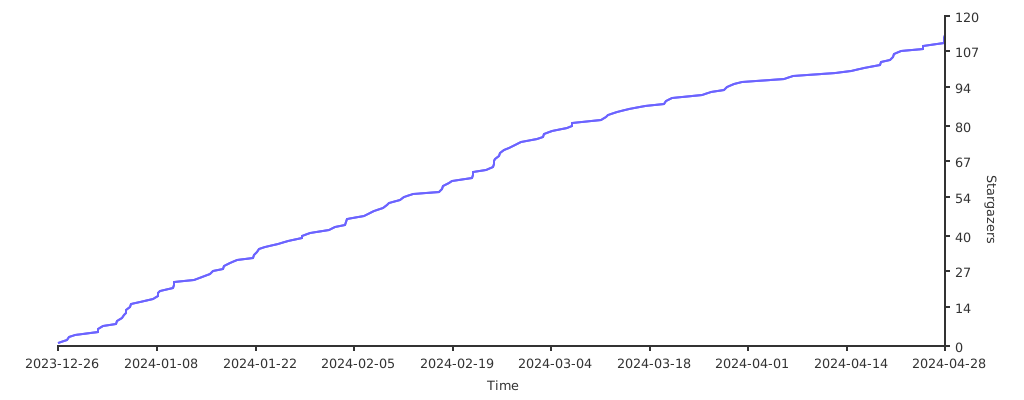
### Stargazers over time
|
||
|
||
[](https://starchart.cc/dlgt7/TVbox-interface)
|
||
|